
Blog
Case management software for law firms in Malawi: what to look for
By Gabriel Kadiwa, Founder & Full-Stack Developer
· Last updated
Good case management software for a Malawian law firm keeps every matter, document and deadline in one secure place your team logs into, makes any file quick to find, and fits the way your firm already works. It should also cut the time spent on routine paperwork, keep client data private, and come with proper backups and local support. If you're comparing options, judge them on these points, not on how long the feature list is.
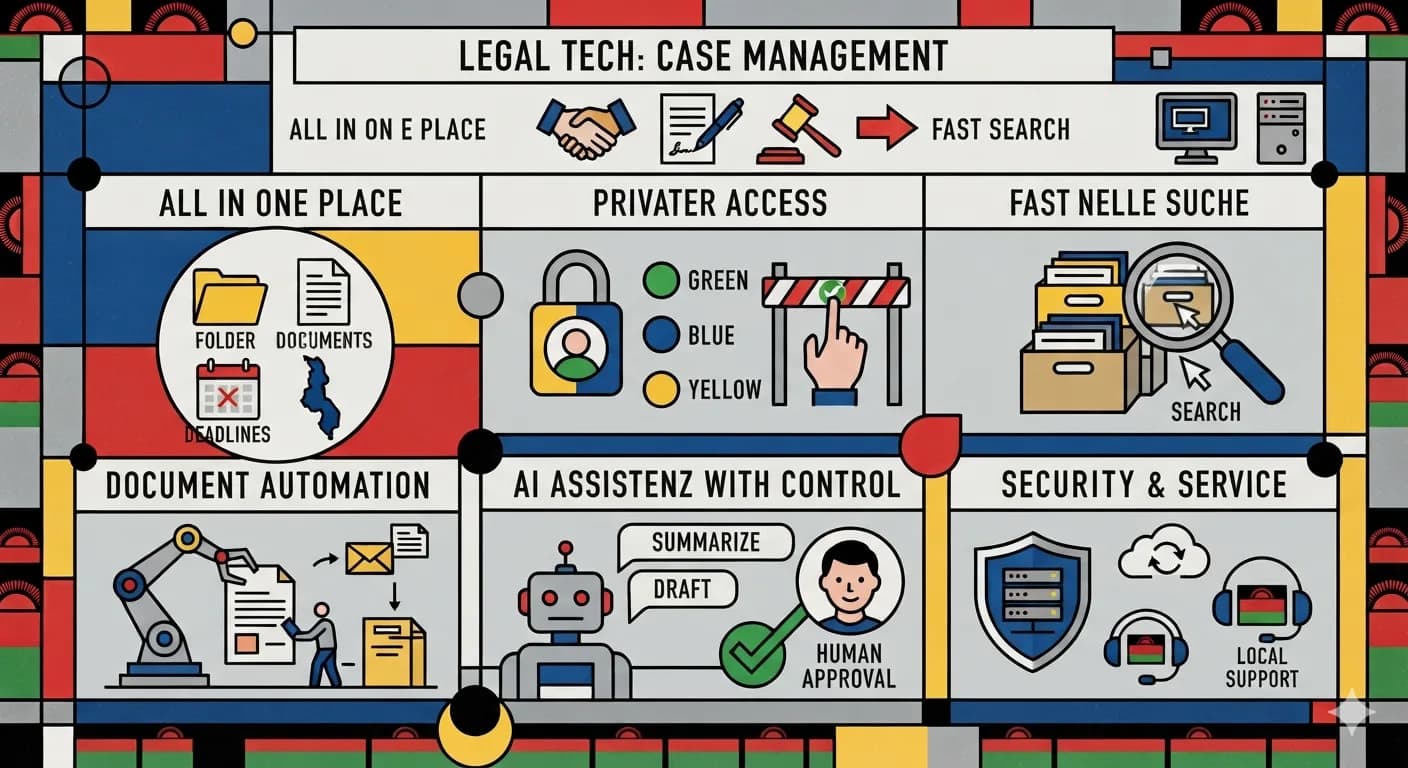
Good case management software for a Malawian law firm keeps every matter, document and deadline in one secure place your team logs into, makes any file quick to find, and fits the way your firm already works. It should also cut the time spent on routine paperwork, keep client data private, and come with proper backups and local support. If you're comparing options, judge them on these points, not on how long the feature list is.
Below we go through each point in turn, with questions you can put to any supplier, including us.
Start with how your firm works now
Before you look at any software, write down how a matter moves through your office today. Who opens a new file? Where do client details go? Who drafts letters and pleadings, who checks them, and how do you keep track of court dates?
Many firms get by with paper files, shared folders, spreadsheets and WhatsApp groups. That can work for years. It starts to fail when the firm grows, when a staff member leaves and takes their knowledge with them, or when a partner can't find a document while standing outside court.
Software should follow your process, not make you rebuild your firm around someone else's idea of how a law office runs. If a supplier can't explain how their system would handle your intake, drafting and filing steps, that tells you something.
Every matter in one place
The main job of a case management system is to give each matter a single home. When someone opens a case, they should see:
- Client and opposing party details
- The documents attached to that matter
- Key dates and what's coming up next
- Notes and a history of what has been done, and by whom
If staff still need to check three places to answer "where are we on this case?", the system isn't doing its job.
A private login and sensible access
Legal files are confidential. Any system you choose should sit behind a private login, with each staff member using their own account rather than a shared password.
Ask whether you can control who sees what. A receptionist may need client contact details but not case notes. A junior associate may only need the matters they're working on. Individual accounts also mean you can see who changed what.
Also ask where your data is stored and who can reach it. Malawi has data protection law that applies to personal information. Your supplier should be able to explain plainly how they protect your clients' data.
Search that actually finds things
This sounds basic, but it's one of the biggest daily time-savers. Staff should be able to type a client name, case number or a few words and land straight on the right file.
When you see a demo, test it yourself. Ask the supplier to find a particular case, or a document from a particular client. If it takes several clicks and some guesswork, imagine doing that fifty times a day.
Help with documents and routine paperwork
A lot of legal work involves putting the same details into forms and documents again and again: names, addresses, case numbers, dates. Good software should pull those details from the matter record so nobody types them twice.
This is also where practical AI is starting to help law firms, which brings us to the next point.
AI that helps, with a person in charge
AI is now built into some case management tools. Used properly, it can take on the routine work: drafting, summarising long case files, searching documents and answering staff questions from your firm's own records.
As an example, an AI-assisted legal case management system we're building for a Malawian law firm lets staff say what they want done in plain words, and the system does it. It can:
- Fill in documents from a chat request. The AI completes the required fields and shows them in the chat. Staff check them, confirm and save.
- Find files and cases and take staff straight to them.
- Pull up data on request.
- Summarise cases, so a partner can catch up on a matter quickly.
The important part is that last step in document filling: a person checks and approves before anything is saved. In legal work you can't let AI produce documents unchecked. Whatever system you look at, ask:
- Does a person approve AI output before it's used?
- Is our data used only inside our system, or sent somewhere else to train other tools?
- Can we switch the AI features off if we don't want them?
Our approach is that data stays private and humans approve outputs. Any supplier you work with should be able to give you a clear answer on both.
Off-the-shelf or built for you?
There are two broad routes.
Off-the-shelf software is ready to use and often paid for monthly. It can work well if your process matches what the product expects. The downsides are that many products are designed around other countries' legal systems, you may pay for features you never use, and changing anything to suit your firm can be hard or impossible.
A custom system is built around how your team works. It takes longer to set up and costs more at the start, but it fits your process, your documents and your reporting. You can also add to it over time.
Neither is right for every firm. A small practice with a simple workflow may be fine with an existing product. A firm with its own way of working, or one that wants AI built around its own documents, will usually get more from a system designed for it.
Backups, hosting and support
Ask the dull questions, because they matter most when something goes wrong:
- Backups: How often is data backed up, and has anyone tested restoring it?
- Hosting: Where does the system run, and who looks after it?
- Updates and security: Who keeps the software up to date?
- Support: If something breaks on a Monday morning, who do you call, and how fast do they respond?
A supplier you can reach on WhatsApp, in your time zone, is worth a lot when a deadline is close.
Questions to ask before you sign
Here's a short checklist for any demo or proposal:
- Can you show me a working demo using a matter that looks like ours?
- How does the system handle our intake, drafting and filing steps?
- Does each staff member get their own login, and can we limit who sees what?
- How fast can I find a specific case or document?
- If there is AI, does a person approve every output, and where does our data go?
- Is the scope and price fixed and written down?
- Who handles hosting, backups and support after launch?
- Can we add features later without starting over?
What a custom system costs with us
Every case management system we build starts with a discovery and demo from MWK 900,000 (US$520). That's where we map your process and show you something working before you commit to a full build.
After that, you can choose:
- A fixed-scope system from MWK 7,000,000 (US$4,000)
- A phased build from MWK 4,500,000 (US$2,600) per phase, if you'd rather start with the essentials and add more later
- A monthly retainer from MWK 450,000 (US$260) a month for ongoing development and support
How we work
It starts with a free 30-minute discovery call. Next, you see a working demo or a video tour. We then send one written proposal with a fixed scope and price. We build in short cycles and show you progress every one to two weeks. After launch, hosting, backups and support carry on through a monthly care plan.
We reply to enquiries within 24 hours, Monday to Friday, and WhatsApp is the fastest way to reach us.
Next step
To see what a case management system built around your firm could look like, read more about our management systems, including case management for law firms, or our AI & automation work.
Book a free 30-minute discovery call and we'll talk through how your firm works today and what would make the biggest difference.